VPN for AI Tools: Private, Stable Access to ChatGPT, Claude and Gemini
In April 2026, a censorship-tracking report from voidly.ai measured AI-assistant reachability across dozens of countries and found ChatGPT showing block or interference signals in roughly 20 of them, while Gemini showed the widest footprint of all three — interference in 17 markets. If you’ve ever opened Claude or ChatGPT on a work trip and watched the page hang on hotel Wi-Fi, you already know how fragile that connection can feel. What actually stays in your control is simpler: how private your prompts are while they cross someone else’s network, and how stable that connection feels from one Wi-Fi hotspot to the next.
One thing this article is not about: shopping around for a cheaper regional subscription price by spoofing your location. That’s a billing question, not a privacy one. This is about keeping your own conversations private and your connection steady, wherever you happen to be working from.
What Your Prompts Say About You
Every message you send to an AI assistant is a small confession. People paste in salary numbers to ask about a budget, symptoms to ask about a diagnosis, and half-finished contracts to ask for a rewrite — often without thinking twice. A 2026 industry privacy report found that 21% of users admit to sharing financial or medical information with an AI chatbot, and that nine of the ten most-used consumer AI apps train on conversation history by default unless a user actively opts out. Separately, a YouGov-cited survey put general concern about corporate data misuse at 92% of people — up from 89% the year before — and found that 43% of users have already stopped using a specific AI tool over privacy worries.
A single chat session can reveal:
- Financial details — account balances or salary figures typed in for a budgeting question.
- Health information — symptoms, medications, or a lab result pasted in for an explanation.
- Unreleased work — draft contracts, source code, or product plans pasted in for edits or debugging.
- Identity fragments — your name, employer, location, and writing style, stitched together across months of chat history.
A VPN encrypts the trip your prompt takes to reach the AI provider’s servers — it has no effect on what the provider itself does with your message once it arrives. Check the app’s privacy settings, and avoid pasting anything you wouldn’t want stored indefinitely.
Public Wi-Fi Turns Every Prompt Into a Postcard
Airport lounges, hotel rooms, and co-working cafés all share one property: you don’t control the network. Even when an AI chat runs over HTTPS, the network operator — and anyone else sharing that Wi-Fi — can still see which servers you’re talking to, when, and how often, simply from the connection metadata. On an unencrypted or poorly secured hotspot, that visibility can go further. A VPN closes that gap by wrapping your entire connection, DNS lookups included, inside a single encrypted tunnel before it ever touches the local network.
What a VPN Actually Changes for Your AI Workflow
RunVPN runs your connection through AmneziaWG or VLESS-Reality on the Xray engine — protocols tuned for speed and resistant to the kind of deep packet inspection that causes slow, unstable connections on some networks. That’s a connection-quality and privacy improvement, not a claim about guaranteed reachability everywhere: no single app can promise a specific AI provider will be reachable on every network, since that also depends on the provider’s own policies. Combined with a no-logs policy, it means RunVPN itself has nothing to hand over about your AI sessions, because it never recorded them.
| Without a VPN | With RunVPN | |
|---|---|---|
| Network operator visibility | Sees which servers you connect to, and when | Sees only one encrypted tunnel |
| Public Wi-Fi exposure | Traffic metadata visible to others on the network | Encrypted end-to-end before it leaves your device |
| Connection stability | Varies with local throttling and congestion | Tuned protocols aim for a steadier route |
| Activity logs | Depends on the network and the AI provider | RunVPN keeps none |
Setting Up Private AI Access in Three Steps
Getting protected takes less time than most AI chats do to load on a bad connection:
- Download the RunVPN app — available now on Android, with iOS coming soon.
- Sign in with Google, email, or Telegram. There’s no manual server list or config file to import.
- Tap Connect. The app fetches its configuration automatically over an encrypted connection built on VLESS-Reality and starts protecting your traffic before you open your AI assistant.
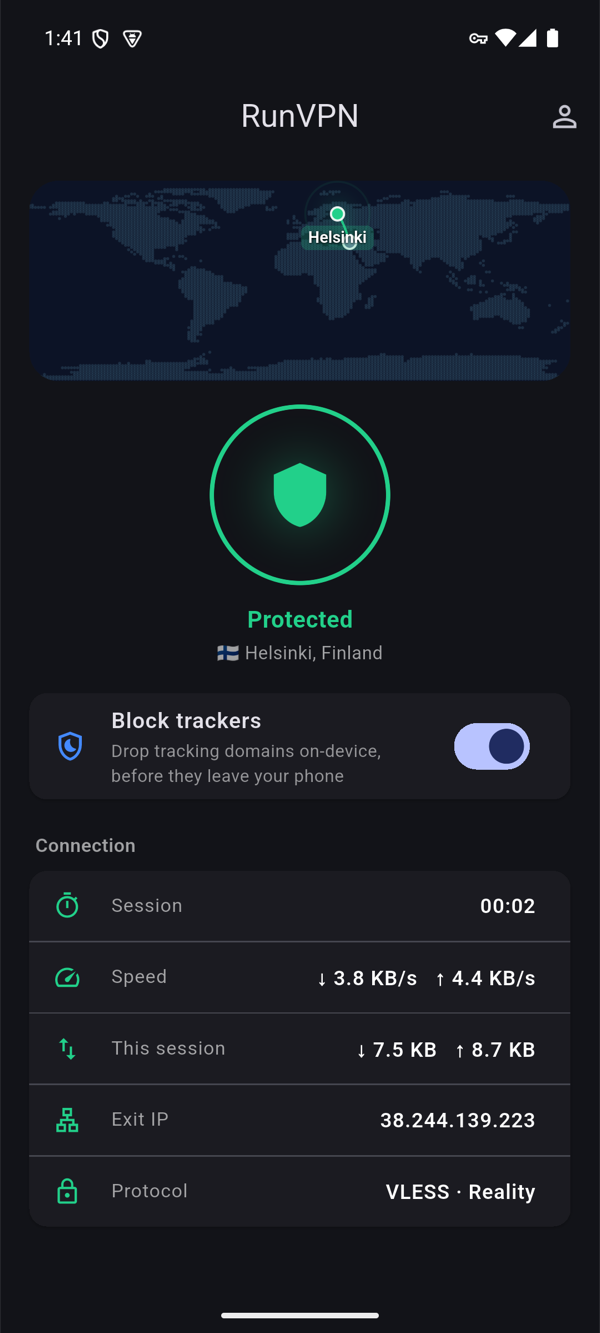
One account covers up to five devices, so the same protection follows you from your phone to a tablet without separate setup.
FAQ
Does a VPN slow down AI chat responses? Encryption adds a small amount of overhead, but protocols like AmneziaWG are built to keep that impact minimal. For text-based chat, the difference is rarely something you’ll notice.
Will a VPN guarantee I can reach every AI assistant everywhere? No single tool can promise that, since reachability also depends on the network and the provider’s own policies. What a VPN reliably improves is the privacy and stability of the connection you do have.
Is using a VPN with AI tools legal? In the vast majority of countries, VPNs are a mainstream, legal privacy tool used by millions of people daily. Rules vary by jurisdiction and by employer network policy, so check local guidance if you’re unsure.
Does RunVPN see what I type into ChatGPT or Claude? No. RunVPN encrypts your connection and keeps no activity logs — it has no visibility into your prompt content, which travels separately over HTTPS between your device and the AI provider.
Keep your AI conversations private on every network. Get RunVPN.